Weather & Rain Radar Forecast
- 4.8
- Rating
- 1.00M
- Installs
- Free
- Price
 Analysis by App-foxy
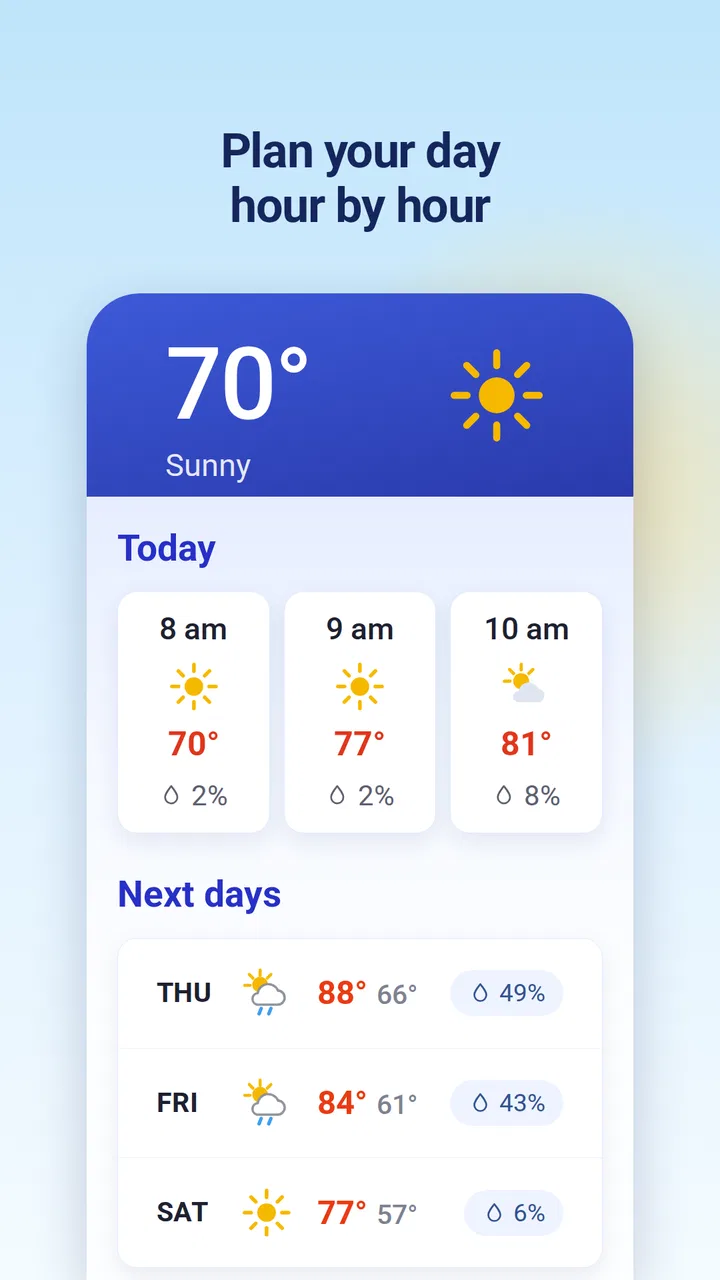
Weather apps are easy to like during the first rainy morning and surprisingly difficult to keep using once the novelty wears off. I spent time with Weather & Rain Radar Forecast to see whether it could become part of a normal daily routine rather than just another icon opened before a weekend trip. My impression is that it has a clear purpose: it combines live rain radar, weather maps, a longer forecast window, and alerts for several disruptive conditions in one free app from Deep Orbit.
That combination makes a strong first impression, especially if your main question is not “What is the temperature?” but “Will rain reach me soon, and should I change my plans?” The app is listed in the Weather category, is suitable for Everyone, and has reached over 100 thousand installs. Its average rating is 4.5, which suggests that many users find the central experience useful. I would still judge it by a more practical standard: does it help me make better decisions repeatedly, without demanding too much attention?
What the first week feels like
The most appealing part of the app is the shift from a single forecast number to a visual view of changing conditions. A conventional weather screen can tell me that rain is expected today, but a radar map helps answer a more useful question: is the rain moving toward my area, passing around it, or already clearing? That distinction matters when I am deciding whether to walk, cycle, take public transport, or wait before leaving.
You May Also Like

 AccuWeather: Weather Radar
AccuWeather Review: A Quick, Clear Forecast for Everyday Decisions
For everyday plans, the best forecast is the one you can understand quickly. AccuWeather makes rain timing, radar, and local conditions easy to act on, with a few trade-offs.

 Hill Climb Racing
Why Hill Climb Racing Still Turns Crashes Into One More Run
A tiny car, a bumpy hill and one more upgrade: Hill Climb Racing keeps resurfacing because its simple chaos makes every near-miss feel personal.

 AliExpress - Shopping App
AliExpress Makes Global Shopping Feel Personal, but Shoppers Bear the Risk
AliExpress turns a global marketplace into a pocket-sized discovery engine. Its reach is useful, its shopping loop compelling, and its trade-offs easy to miss.

 Lords Mobile: Kingdom Wars
Lords Mobile Is a Kingdom-Building Routine, Not a Quick Match
A case-by-case verdict on the building, battles, device demands, and social commitments that make Lords Mobile rewarding for some players and exhausting for others.

 PDF Scanner app - TapScanner
TapScanner Makes Paperwork Easier to Capture, Check, and Share
TapScanner makes scanning with a phone feel less like a rescue operation and more like a dependable step in getting work done. Its capture tools are useful, though not flawless.

 Block Blast!
 Shows How Much a Puzzle Game Can Leave Out
A quiet grid game shows why puzzle players increasingly value instant clarity, repeatable skill and low-pressure play—and where the genre still needs to catch up.
More From Our News Desk
View All News


During the first few days, I found myself checking the radar before looking at the broader forecast. That is a good sign for this particular app because the map is not just decoration; it gives the weather a sense of movement. A forecast can feel abstract, while a live map makes timing easier to understand. It is especially handy when the sky looks uncertain and I need a quick decision rather than a detailed meteorological explanation.
The longer forecast is useful for planning beyond tomorrow. A fourteen-day outlook can help me think about a trip, outdoor work, laundry, or an appointment that cannot easily be moved. I treat the distant days as a planning guide, not a promise. The nearer the date, the more seriously I take the forecast; farther out, I use it to notice broad patterns and then check again later.
That is one of the most important habits with any extended forecast: use it to identify when to revisit a plan, not to lock in a decision too early. Weather & Rain Radar Forecast works best when I return to the map and near-term conditions as the event approaches. The app can support that workflow, but it cannot remove the uncertainty that comes with looking several days ahead.
The storm, wind, and snow alerts add another reason to install it. I do not want to open a weather app constantly just to discover that conditions have changed. Alerts can make the app more useful in the background, particularly for people who commute, work outside, drive long distances, or live somewhere where sudden weather changes affect daily safety. At the same time, I would configure them carefully. Too many notifications can turn a helpful weather tool into another source of phone fatigue.
Reading the map instead of merely watching it
A useful approach is to look at the radar in layers of time. First, I check what is happening around my current area. Then I look in the direction from which the weather is moving. Finally, I compare that movement with the time I expect to leave. This is more informative than staring at one colored patch and assuming it will behave exactly as shown.
I also recommend checking the map from the same place before making a routine decision. After a few uses, I became quicker at recognizing the local pattern: whether showers usually pass quickly, whether a larger band is approaching, or whether the apparent gap is too narrow to rely on. That is a small but meaningful advantage over a basic daily forecast, because the app encourages observation rather than passive reading.
There is a trade-off, however. Maps require interpretation. Someone who wants a single sentence such as “take an umbrella at 8 a.m.” may find a radar view more work than necessary. The app is better suited to users who appreciate seeing the situation develop and are willing to spend a few seconds making sense of it.
A realistic morning routine
Imagine a normal workday with a short walk to a station. I would check the radar before breakfast, then look at the near-term forecast for the departure period. If a rain band appears close, I would check whether it is moving toward the route or away from it. I might leave a little earlier, choose a different route, or take an umbrella. Later, an alert about strong wind or snow could change the plan again without requiring repeated manual checks.
That workflow is where the app feels more valuable than an ordinary temperature widget. It connects weather information with a decision. The benefit is not that it predicts every minute perfectly; the benefit is that it gives me more context before I commit to leaving home.
Why it can remain useful month after month
Most weather apps earn their place through repetition, not excitement. Weather & Rain Radar Forecast has a reasonable chance of becoming a daily utility because its features cover different time horizons. The radar helps with the next few hours, the forecast helps with upcoming plans, and alerts can bring important changes to my attention. Those roles complement each other instead of forcing one screen to do everything.
For regular commuters, the recurring value comes from quick checks before departure. For parents, the map can help with school runs and outdoor activities. For gardeners, tradespeople, delivery workers, and anyone who spends time outside, wind and rain information can influence practical choices. The app also makes sense for travelers who want a broad look at the coming days while still checking immediate conditions on the morning of an excursion.
I would not install it solely for a long-range forecast. Many weather services offer a similar broad view, and the farther-out dates naturally deserve caution. The stronger reason to keep this app is the combination of that planning view with live radar and weather-related alerts. If I only need the current temperature, a simpler alternative may be faster and less distracting.
The app’s free price lowers the barrier to trying it as a secondary weather tool. That matters because weather preferences are personal: one person wants maps, another wants a clean forecast list, and someone else mainly wants notifications. I can test whether the radar fits my routine without treating the installation as a major commitment.
Its current version is 72.0, and the minimum operating-system requirement is Android 7.0. That makes it accessible on a wide range of Android devices, including phones that are not running the newest software. For me, compatibility is part of long-term value: an app is less useful if it immediately forces a hardware upgrade or works only on recent phones.
Three habits that improve the experience
First, I would use the radar for timing and the longer forecast for planning, rather than treating both views as interchangeable. The radar is most helpful when a decision is close in time. The extended forecast is better for spotting possible changes to a plan and deciding when to check again.
Second, I would review alert settings after the first few days. If every possible weather change interrupts me, I am likely to disable notifications completely. A smaller set of meaningful alerts is more sustainable. The app’s support for storm, wind, and snow makes it possible to focus attention on conditions that genuinely affect my routine rather than turning every cloud into an event.
Third, I would compare the map with what I can see outside before making a high-consequence decision. Radar is valuable context, but it should not replace common sense when roads are dangerous, visibility is poor, or conditions are changing quickly. This is a practical limitation of the whole category, not a flaw unique to Deep Orbit’s app.
These habits also reveal a subtle trade-off. The more carefully I use the app, the more useful it becomes, but that usefulness depends on a little interpretation. It is not a completely passive tool. People who enjoy making quick judgments from visual information will probably appreciate that. People who want every answer reduced to one definitive instruction may prefer a simpler alternative.
The maintenance burden over time
A weather app should not require much maintenance, and this one generally fits that expectation. The recurring work is mostly behavioral: remembering to glance at the radar before weather-sensitive plans, checking longer forecasts again as dates approach, and keeping alerts meaningful. That is a manageable routine if the app solves a real problem in my day.
The main maintenance risk is notification overload. Weather alerts are useful only while I still pay attention to them. If I activate every alert and receive warnings that do not affect my location or plans, I may begin dismissing them automatically. I would rather start conservatively, observe how relevant the notifications are, and adjust my habits than switch everything on immediately.
There is also a maintenance cost in learning to interpret changing forecasts. A forecast for a distant day can move as new information arrives, so I would not use an early view to make an irreversible booking or promise. The app is a planning aid, not a guarantee. Its value grows when I revisit uncertain plans instead of assuming the first forecast will remain unchanged.
For a household, the app can be useful as a shared reference, but different people may want different levels of detail. One person may care about snow alerts, while another only wants rain timing. If everyone checks the same map for a different purpose, the app remains flexible; if someone finds maps confusing, a simpler forecast service may be a better personal choice.
The free model is another reason the maintenance burden feels low from a user’s perspective. I am not adding a recurring payment that I need to justify every month. That does not automatically make the app better than paid competitors, but it changes the decision: the question becomes whether it earns a place on the phone through usefulness, not whether I am trying to recover a subscription cost.
Where the routine can become tiring
The first source of fatigue is checking too often. Live radar creates a temptation to refresh constantly, especially when I am waiting for a shower to pass. That can become counterproductive. I get better results by checking at sensible decision points: before leaving, before starting an outdoor task, or when an alert changes the situation.
The second is overconfidence in visual precision. A detailed map can look authoritative even when weather is naturally variable. I remind myself that a narrow gap between rain areas is not necessarily a reliable promise that my route will stay dry. The app provides useful evidence, but I still allow a margin for error.
The third is the difference between information and action. Alerts can tell me that wind or snow is relevant, but I still need to decide whether to postpone travel, change clothing, protect equipment, or alter a work plan. Users who expect the app to make those choices for them may find the experience less satisfying.
Finally, the app may feel excessive on calm days. If my routine is simply checking whether it is warm enough for a walk, a basic weather widget may be quicker. Weather & Rain Radar Forecast earns its space when conditions are uncertain or when planning depends on timing. It does not need to be the only weather app on a phone, but its role should be clear.
Who should use it and who should skip it
I would recommend it to anyone who regularly asks whether rain is approaching, how long a shower may last, or whether wind, snow, or storms could disrupt a plan. It is particularly suitable for people who prefer visual information and want more context than a simple daily temperature line. The free access and Everyone age rating also make it easy to try across a household.
It is a good fit for outdoor workers, commuters, cyclists, runners, dog owners, parents organizing activities, and travelers who need both immediate awareness and a broader planning view. The combination of radar and alerts is more relevant to those users than a plain “today” forecast.
I would skip it if I want the absolute simplest weather experience. Someone who opens an app only to see the current temperature may find the extra map and alert focus unnecessary. I would also look for a different option if my priority is a specialized forecast for a particular activity and I need highly specific expert tools rather than a general weather companion.
Another reason to choose an alternative would be personal preference for a different presentation. Some users prefer a clean text-first layout, while others want animated maps and visual movement. Weather & Rain Radar Forecast clearly leans toward the latter style. That is a strength when it matches the way I think, but it is not universally better.
My long-term judgment
After the initial curiosity fades, the app’s lasting value depends on whether I use its features as part of a repeatable decision process. The radar has the strongest chance of becoming a habit because it answers immediate questions that a standard forecast can leave vague. The longer outlook supports planning, while alerts can reduce the need for constant checking when conditions become more serious.
Its limitations are equally clear. Visual weather information still needs interpretation, long-range forecasts should not be treated as fixed, and poorly managed notifications can create fatigue. None of those issues cancels out the app’s usefulness, but they do mean that I would not enable every option and forget about it. A little setup and restraint make the experience more sustainable.
Deep Orbit has made a focused weather app rather than an all-purpose lifestyle platform. That focus works in its favor. I know why I would open it: to understand rain movement, inspect upcoming conditions, or stay aware of storm, wind, and snow risks. The app has a 4.5 average from around 892 ratings, and its install base shows that it has found an audience, but my recommendation is based more on the practical workflow than on those figures.
For me, Weather & Rain Radar Forecast earns lasting space when the weather can affect my schedule and I want more than a single forecast sentence. I would keep it installed as a dependable visual check, especially for commuting and outdoor plans. If I lived a routine where weather rarely changed my decisions, I would probably choose a lighter alternative. For everyone else, the best test is simple: use the radar before several real departures, keep only the alerts that matter, and see whether the app helps you act with more confidence without making you think about the weather all day.
FAQs for Weather & Rain Radar Forecast
01What features does the Weather & Rain Radar Forecast app offer?
The Weather & Rain Radar Forecast app provides real-time weather updates, detailed forecasts, and interactive radar maps. Users can track rain, storms, and other weather patterns. It also offers customizable alerts for severe weather conditions, allowing users to stay informed and plan their activities accordingly.
02Is the Weather & Rain Radar Forecast app free to use?
The app offers a free version with basic features, including daily forecasts and radar access. However, there is a premium subscription available that unlocks advanced features such as ad-free usage, more detailed forecasts, and additional radar layers to enhance your weather tracking experience.
03How accurate is the weather data provided by the app?
The app uses data from reliable meteorological sources and advanced radar technology to ensure high accuracy. While no weather forecast can be 100% precise, users generally find the app’s predictions to be dependable for planning daily activities and staying informed about potential weather changes.
04Can I customize the notifications and alerts in the app?
Yes, the Weather & Rain Radar Forecast app allows users to customize notifications and alerts. You can set alerts for specific weather conditions like storms, heavy rain, or extreme temperatures. This feature ensures that you receive timely updates about weather changes that matter most to you.
05What platforms is the Weather & Rain Radar Forecast app available on?
The app is available for both Android and iOS devices. You can download it from the Google Play Store or the Apple App Store. It is designed to work seamlessly across a variety of devices, ensuring a smooth user experience whether you are using a smartphone or tablet.
Pros
- Accurate real-time weather updates.
- User-friendly interface for easy navigation.
- Detailed radar maps with high precision.
- Customizable notifications for alerts.
- Supports multiple locations for monitoring.
Cons
- Ads can be intrusive at times.
- Some features require a subscription.
- Battery consumption can be high.
- Occasional lag in data updates.
- Limited offline functionality.

Weather & Rain Radar Forecast
Gallery